User
Standard organization user access.
 Request a demo →
Define responsibilities once, assign users to the appropriate role and reduce unnecessary administrative privilege across identity operations.
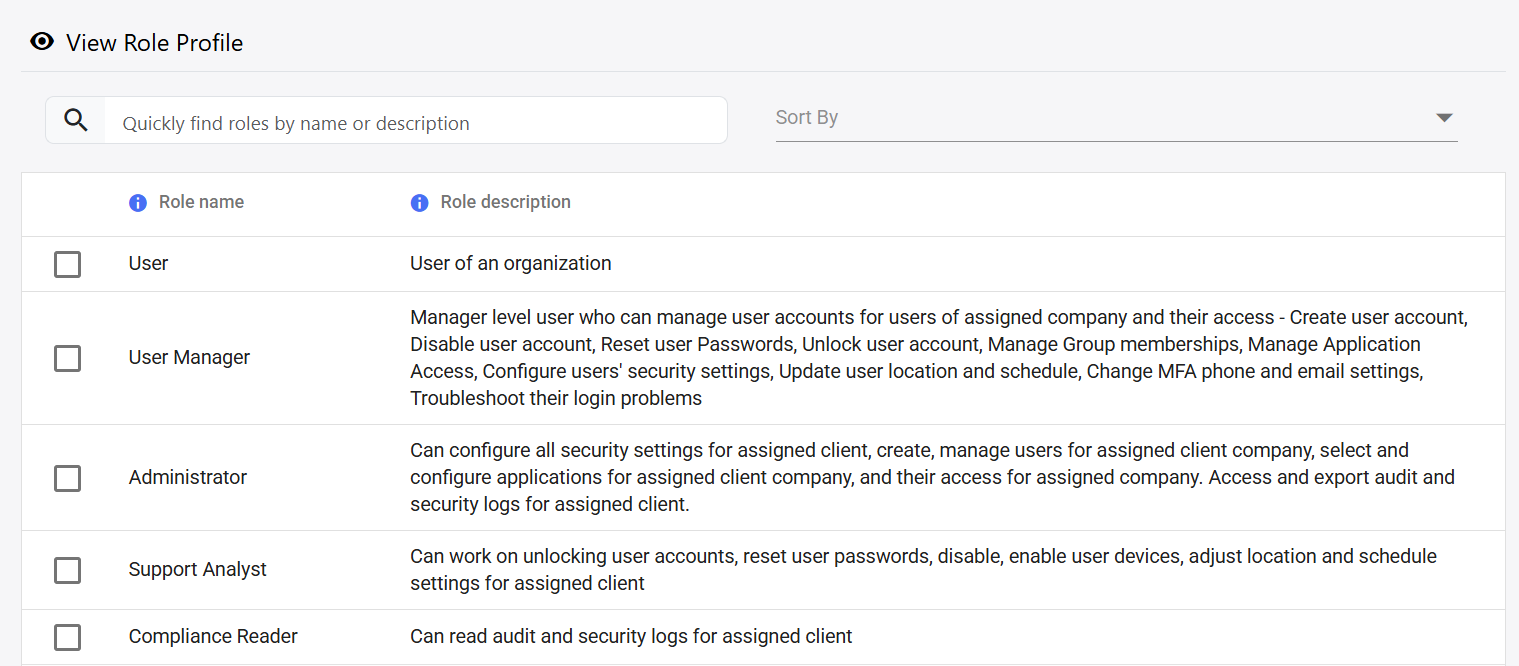 REAL RAINBOW SECURE ROLES DASHBOARD
Broad administrative access increases risk and makes accountability harder. Role-based access control limits each person to the functions required for their work.
Rainbow Secure roles help separate user administration, security configuration, support operations and compliance review.
Use predefined or appropriate organizational roles so users receive only the administrative capabilities they need.
Standard organization user access.
Manage assigned users, memberships, application access and common account support tasks.
Configure security, users, applications and access for the assigned organization.
Handle operational support such as unlocking accounts, password resets and selected user settings.
Read audit and security logs without receiving broader administrative control.
SEARCHABLE ROLE DIRECTORY
Search roles by name or description, review their purpose and assign the appropriate responsibility level to users.
Users receive only the permissions necessary for their responsibilities.
Administration, support and compliance activities remain distinct.
Apply a defined role instead of choosing permissions individually.
Update the user’s role when responsibilities change.
Connect administrative actions to a clear responsibility level.
Show why a user had a particular scope of administrative access.
Map administrators, managers, support teams and compliance reviewers to controlled responsibilities.