A password, OTP or passwordless code
 Book a Demo
Patented interactive authentication
Plain text is only one part of the answer.
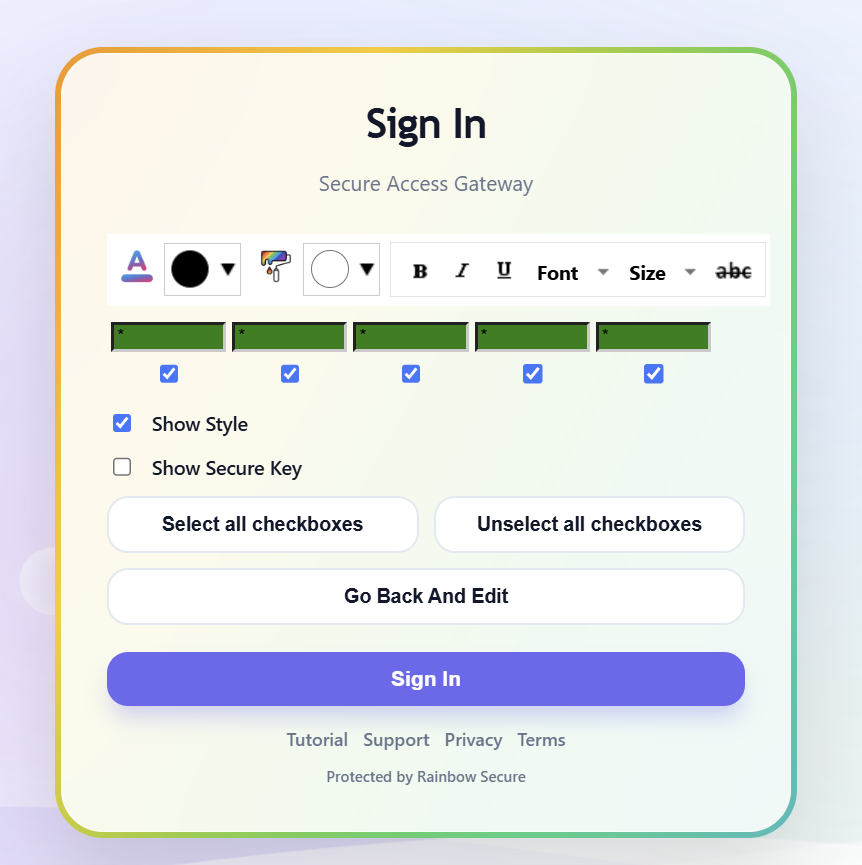
rSecureKey verifies the user’s text and dimensional choices—including color, style, and where those choices are applied. Choosing not to apply a color or style can also be verified.
Color choice ●
Style choice B
Applied where? ⌖
How it works
The user remembers more than a string of characters.
Or intentionally leave either unchanged
Choose where each dimensional choice belongs
What rSecureKey verifies
Text and dimensional choices.
rSecureKey evaluates the value entered, each dimensional choice, and the position where that choice is applied.
Text
The text entered by the user
Color
The selected font or background color—including no color choice
Style
The selected font, size or emphasis—including no style choice
Position
Where each dimensional choice is applied
Interactive demonstration
Make dimensional choices—and decide where they apply.
Choose a quick color, set the style, then select the individual characters where those choices belong. Leaving a color or style unchanged can also be part of the verified choice.
Demonstrated here
Text
Font color
Background color
Style
Position
Jump to color shortcuts ↓
SIMPLIFIED rSECUREKEY DEMO
Font color shortcuts
Choose one or use the custom picker above.
Click a character to choose where your dimensional choices are applied.
This educational demo does not collect or authenticate credentials.Stolen plain text is no longer the complete answer.
Knowing the characters alone does not reveal the user’s dimensional choices or where those choices belong.
PROTECTION IN ACTION
Related threat protection
Brute Force & Keyloggers
Captured or repeatedly guessed text is not the complete rSecureKey response when dimensional choices are required.
- Text can be verified together with color and style choices
- The selected location of formatting adds another interaction dimension
- Repeated failures can feed contextual risk and response policies
See rSecureKey in context
Explore the complete multidimensional verification process.
See how rSecureKey interaction works with authentication methods, context, behavior and access policy.